
With iOS 26.2, Apple Refines Liquid Glass Controls on the Lock Screen. Apple’s software updates often arrive with quiet refinements rather than headline-grabbing reinventions. Yet, taken together, these incremental shifts tend to reveal where the company believes the future of its platforms lies. The apple ios 26.2 update fits squarely into this tradition. By allowing users to roll back or reduce the Liquid Glass visual effect on the Lock Screen, Apple appears to be recalibrating its long-standing balance between aesthetic ambition and functional clarity.
Liquid Glass, introduced as part of Apple’s ongoing visual evolution, emphasizes layered translucency, soft reflections, and depth cues designed to make digital interfaces feel more tactile and immersive. The design language has been widely praised for its polish, but it has also prompted concerns among users who prioritize legibility, battery efficiency, or minimalism. With the apple ios 26.2 update, Apple acknowledges those concerns without abandoning the design philosophy outright.

Understanding Liquid Glass as a Design Language
To understand the significance of this change, it helps to situate Liquid Glass within Apple’s broader design history. Over the past decade, Apple has oscillated between skeuomorphic realism and flat minimalism, eventually settling on a hybrid approach that blends clarity with subtle depth. Liquid Glass is a continuation of that hybrid, aiming to add richness without clutter.
The effect relies on real-time translucency, background blur, and adaptive lighting that responds to wallpapers and system themes. On the Lock Screen, where information density is intentionally low, Liquid Glass was meant to elevate first impressions. However, first impressions are not always synonymous with daily usability.
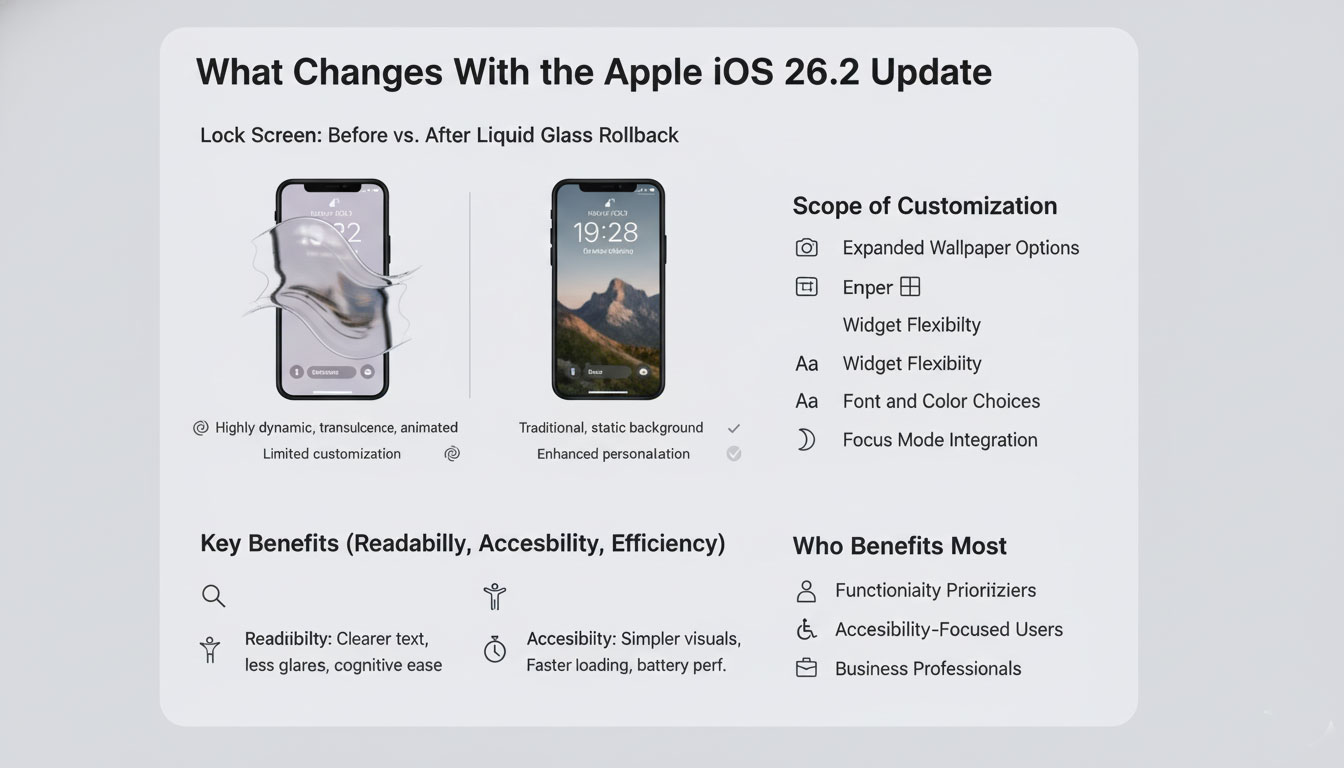
In response, the apple ios 26.2 update introduces a more flexible approach. Users can now tone down or effectively roll back the Liquid Glass appearance on the Lock Screen, returning to a flatter, more opaque presentation while keeping the feature enabled elsewhere.
Lock Screen as a Functional Space
The Lock Screen has evolved into one of the most important surfaces in iOS. It is no longer merely a gateway to the Home Screen; it is a dashboard for time-sensitive information such as notifications, widgets, live activities, and media controls. Any visual treatment applied here must support immediate comprehension.
By allowing adjustments to Liquid Glass specifically on the Lock Screen, Apple signals that context matters. A design that feels elegant in menus or media apps may not serve the same purpose when users glance at their phones in bright sunlight or during a meeting. The apple ios 26.2 update implicitly recognizes that visual consistency should not come at the expense of situational usability.
User Choice Within Apple’s Design Philosophy
Apple has historically resisted deep customization, arguing that too many options dilute coherence and increase cognitive load. When customization is introduced, it is usually constrained and intentional. The ability to roll back Liquid Glass on the Lock Screen follows this pattern.
Rather than offering a full suite of granular controls, Apple provides a targeted adjustment. Users are not redesigning the interface; they are selecting a sanctioned alternative that Apple itself considers valid. In this sense, the apple ios 26.2 update expands user choice while maintaining the company’s curated ecosystem.
Key Information Table On: at a Glance
| Aspect | What Changes in iOS 26.2 | Why It Matters |
|---|---|---|
| Liquid Glass Effect | Can be reduced or rolled back on Lock Screen | Improves legibility and personal comfort |
| Scope of Control | Limited to Lock Screen | Preserves overall design consistency |
| Target Users | Users sensitive to transparency or visual noise | Broadens accessibility |
| Design Strategy | Refinement, not reversal | Signals responsiveness without fragmentation |
Accessibility and Readability Considerations
Accessibility has become a central pillar of Apple’s software strategy. Transparency effects, while visually appealing, can pose challenges for users with visual impairments or sensitivity to contrast. Although Apple already offers accessibility settings to reduce transparency system-wide, those options are often seen as blunt instruments.
The apple ios 26.2 update offers a more nuanced solution. By isolating the change to the Lock Screen, Apple avoids forcing users to compromise elsewhere in the system. This approach aligns with Apple’s emphasis on inclusive design that adapts to diverse needs without stigmatizing accessibility features as “special modes.”
Performance and Battery Implications
While Apple rarely frames design changes in terms of performance, visual effects do carry computational costs. Real-time translucency and dynamic lighting require GPU resources, particularly on older devices. For users holding onto previous-generation iPhones, even small efficiency gains can be noticeable.
Rolling back Liquid Glass on the Lock Screen may contribute to marginal improvements in responsiveness or battery longevity, especially for users who frequently wake their devices. Though Apple has not positioned the apple ios 26.2 update as a performance release, the practical benefits may still be felt.
Consistency Across the Apple Ecosystem
Another dimension of this update is its relationship to Apple’s broader ecosystem. Apple increasingly designs its platforms with cross-device coherence in mind, from iPhone and iPad to Mac and Apple Watch. Liquid Glass, as a design motif, appears across multiple interfaces.
Allowing selective rollback on the Lock Screen suggests Apple is comfortable with contextual divergence. In other words, consistency does not necessarily mean uniformity. The apple ios 26.2 update demonstrates that Apple is willing to let different surfaces serve different priorities while still feeling part of the same family.
Developer and Designer Implications
For developers, system-level design changes can influence how apps are perceived, even if app interfaces remain unchanged. A more subdued Lock Screen can shift visual contrast when transitioning into apps, subtly affecting user experience.
Designers who align closely with Apple’s Human Interface Guidelines may see this update as a reaffirmation that clarity trumps spectacle. The apple ios 26.2 update reinforces the idea that design is iterative, responsive, and grounded in real-world use rather than static ideals.
A Pattern of Incremental Responsiveness
This is not the first time Apple has adjusted course after introducing a bold visual idea. Historically, features such as dynamic wallpapers, motion effects, and notification styles have all undergone refinement in response to user feedback.
Viewed through this lens, the apple ios 26.2 update is less a retreat and more a recalibration. Apple is not abandoning Liquid Glass; it is acknowledging that no single design solution fits every context.
Market and User Perception
Among global users, reactions to design changes often vary by region, usage patterns, and cultural expectations. In markets where iPhones are used heavily outdoors or in professional settings, readability can outweigh visual flair. The option to roll back Liquid Glass on the Lock Screen may resonate particularly strongly with those audiences.
From a brand perspective, the apple ios 26.2 update reinforces Apple’s image as a company that listens, albeit on its own terms. The change is subtle enough to avoid signaling uncertainty, yet meaningful enough to demonstrate responsiveness.
Looking Ahead
The implications of this update extend beyond the Lock Screen. As Apple continues to evolve iOS, the tension between expressive design and practical function will remain. Features like Liquid Glass are likely to persist, but with increasing flexibility built around them.
The apple ios 26.2 update suggests that future iterations of iOS may lean further into context-aware customization. Rather than offering blanket on-or-off switches, Apple may continue to refine where and how visual effects appear.
At first glance, the ability to roll back Liquid Glass on the Lock Screen may seem like a minor tweak. In reality, it reflects a deeper design philosophy at work. With the apple ios 26.2 update, Apple demonstrates that refinement, not reinvention, often defines its most consequential decisions.
By prioritizing clarity, accessibility, and contextual usability, Apple reinforces its commitment to a user experience that evolves with feedback and real-world use. In doing so, it reminds both users and competitors that design maturity lies not in doubling down on aesthetics, but in knowing when to step back.


